

Introduction
Losing email data can happen due to server migration, accidental deletion, or hosting issues. Having a manual backup of your email ensures you can always restore your messages and account settings whenever needed. This article explains how to manually backup and restore email data using cPanel File Manager.
Solution
Panel stores all email data inside two directories: mail and etc. By compressing and downloading these folders, you create a full backup of all email accounts and messages on your hosting.
Step by Step
Backup E-Mail
- Login to cPanel Dashboard
- Open File Manager
- Select both the
etcandmailfolders (hold Ctrl to select both) - Right-click and choose Compress, then select your preferred format (Zip recommended)
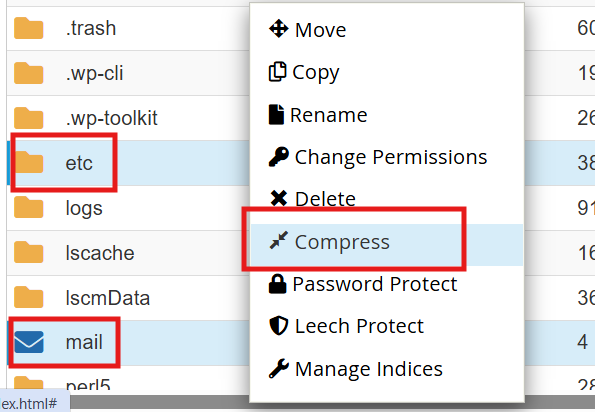
- Once compression is done, right-click the archive file and click Download
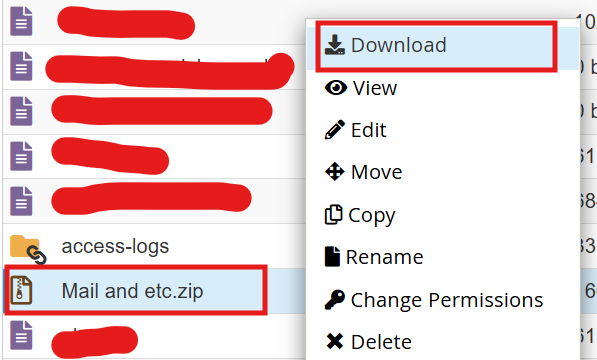
- Save the file to a safe location on your computer or restore to another cPanel Account
- Done
Restore E-Mail
- Extract the backup file on your local computer — make sure you have the
etcandmailfolders ready - Login to cPanel and open File Manager
- Rename the existing
etcandmailfolders toetc_oldandmail_old(as a safety measure) - Click Upload and upload the extracted
etcandmailfolders from your backup - Verify your emails are accessible via Webmail
- Done